
Video Plus - Movie Editor 1.3
- Версия
- Video Plus - Movie Editor 1.3
- Разработчик
- Day 1 Solutions SRL
- Язык интерфейса
- English
- Активация
- K'ed by HCiSO
- Совместимость
- macOS 10.13 или новее
Похожие программы



Скриншоты
Нажмите, чтобы увеличить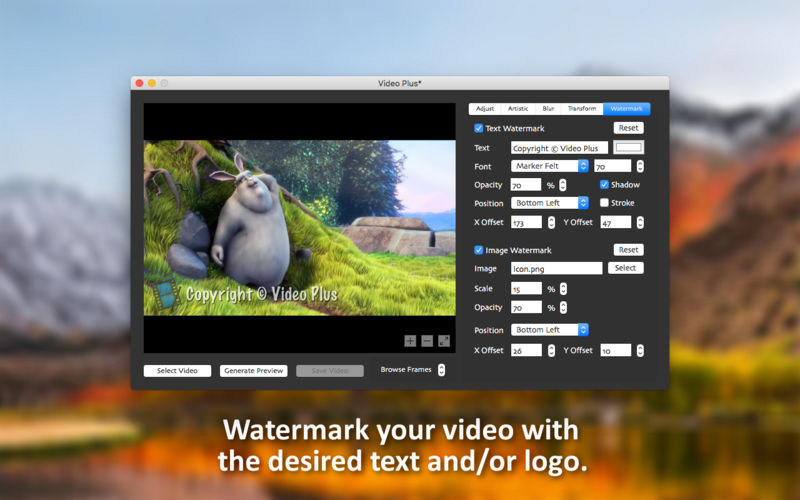
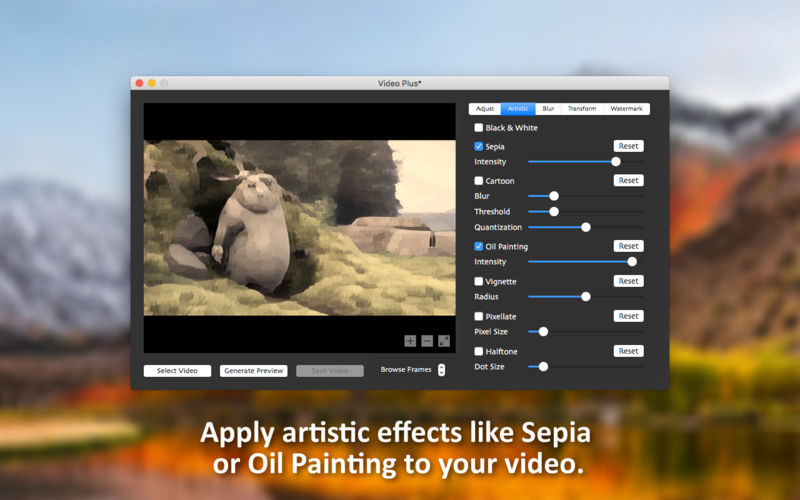
Video Plus позволяет настраивать, создавать водяные знаки, масштабировать, поворачивать и применять художественные эффекты к вашим видео. Если у вас есть видео на вашем Mac, которое необходимо отрегулировать и обозначить водяным знаком, вам повезло. Video Plus - это все-в-одном решение для обработки видео, которое любой энтузиаст фильма должен иметь в своем наборе инструментов.
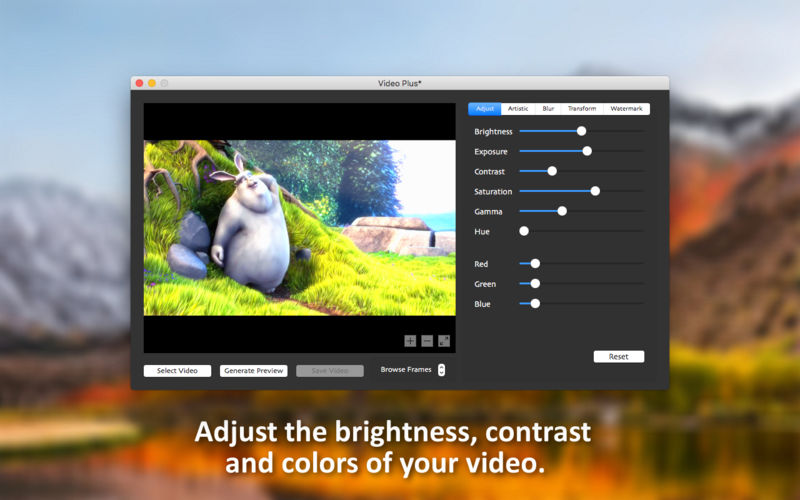
Adjust the following settings:
- Brightness (make your video darker or brighter)
- Exposure (change the exposure of your video)
- Contrast (change the contrast of your video)
- Saturation (increase or decrease the saturation level of your video)
- Gamma (change the gamma of your video)
- Hue (change the hue of your video)
- RGB values (independently modify the Red, Green and Blue channels of your video)
- Apply the following artistic effects:
- Black & White (makes your video black-and-white)
- Sepia (makes your video look old)
- Cartoon (makes your video look like a cartoon)
- Oil painting (makes your video look like an oil painting in motion)
- Vignette (makes your video darker around the edges)
- Pixellate (pixellates your video)
- Halftone (makes your video look like a newspaper picture in motion)
Apply the following blur effects:
- Standard blur (applies a standard blur effect to your video)
- Circle blur (only applies blur to a central circular region of your video)
- Focus blur (applies a blur effect on the outer regions of your video bringing the center in focus)
- Motion blur (applies a blur effect that gives your video the impression of movement)
- Zoom blur (applies a blur effect that gives your video a zoom motion)
Apply the following transformations:
- Scale (scales your video)
- Rotate (rotates your video)
- 3-D transformation (applies a 3D transformation to your video)
- Swirl (applies a swirl effect in the center of your video)
- Glass sphere (projects your video on a glass sphere)
Apply a text watermark:
- Text (this is the text that will appear watermarked on your video)
- Text color (change the color of your text)
- Font type (choose from 20 types of hand-picked fonts)
- Font size (change the font size of your text)
- Opacity (make your text more opaque or transparent)
- Shadow (make your text more visible by adding a shadow effect)
- Stroke (make your text more visible by adding a stroke effect)
- Position (you can choose between: bottom left, bottom right, top left, top right, and center)
- X Offset (for an exact horizontal positioning of your text)
- Y Offset (for an exact vertical positioning of your text)
Apply a logo watermark:
- Image (you can select any JPG or PNG image on your Mac)
- Scale (change the scale of your selected image according to your needs)
- Opacity (make your logo more opaque or transparent)
- Position (you can choose between: bottom left, bottom right, top left, top right and center)
- X Offset (for an exact horizontal positioning of your logo)
- Y Offset (for an exact vertical positioning of your logo)
- Supported video formats: MOV, M4V, MP4, 3GP, and 3G2
Version 1.3
- The app has been updated to run natively on both Intel and Mac Silicon platforms.
- The minimum OS version requirement has been increased to 10.13
- Minor fixes have been implemented.
- New Icon
Комментарии
Комментариев пока нет. Будьте первым
Комментарии оставляют зарегистрированные пользователи.